





- May 7, 2019
- FOXITBLOG
Bates numbering gives you an easy way to index a large number of documents, such as invoices or legal papers. All you need is PDF software like Foxit PDF Editor Pro.
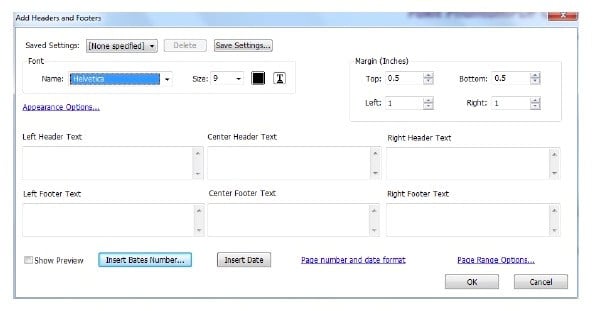
CAPTION: Bates numbering in Foxit PDF Editor Pro gives you control over your numbering system.
Create a system for Bates numbering
First, you need to create a system for indexing. Bates numbering typically places numbers and/or date/time-marks on images and documents. In Foxit PDF Editor Pro, you have the option to set the number of digits, the start number, the rotate angle (if you need to turn characters on their sides or at an angle), and the prefix/suffix.
Add Bates numbering
Once you have your system worked out, click on the ORGANIZE tab and select Page Marks > Bates Numbering > Add. This will open the Bates numbering dialog box where you can select the files and folders you’re indexing. You can rearrange the order of the files and/or folders if you wish. Then select the output folder to tell your PDF software where to save your documents.
Choose how your numbering scheme looks
Now, choose whether to use headers and footers. Select the location of the number and add any text you want. You can also add a date stamp in one of six different locations. Click OK.
The final dialog box lets you:
- Choose how many digits you want
- Choose the starting number
- Add a prefix
- Add a suffix
- Select a rotation angle for your numbering stamp
Now click OK and your selected documents will be processed and saved to the output folder you selected.
Using PDF software to apply Bates numbering beats hand stamping hundreds, or even thousands, of documents. And imagine how much faster and easier it is to search for PDF documents than it is to rifle through file cabinets!
For more details, see page 73 of the Foxit PDF Editor Pro User Manual.