 Chat with PDF
 PDF Summarizer
 Document Translator
 Analyze Document
 Extract Information
 Risk Analysis
 Contract Review
 Fraud Detection

Foxit Workspace
Part of Foxit AI
Insights across every document. Work you can deliver.
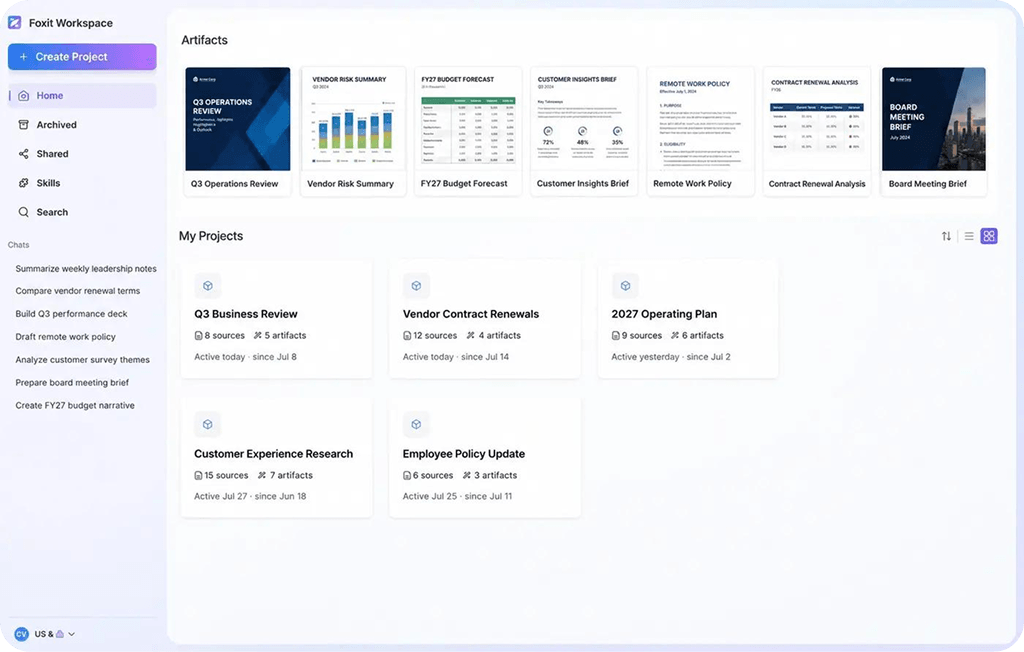
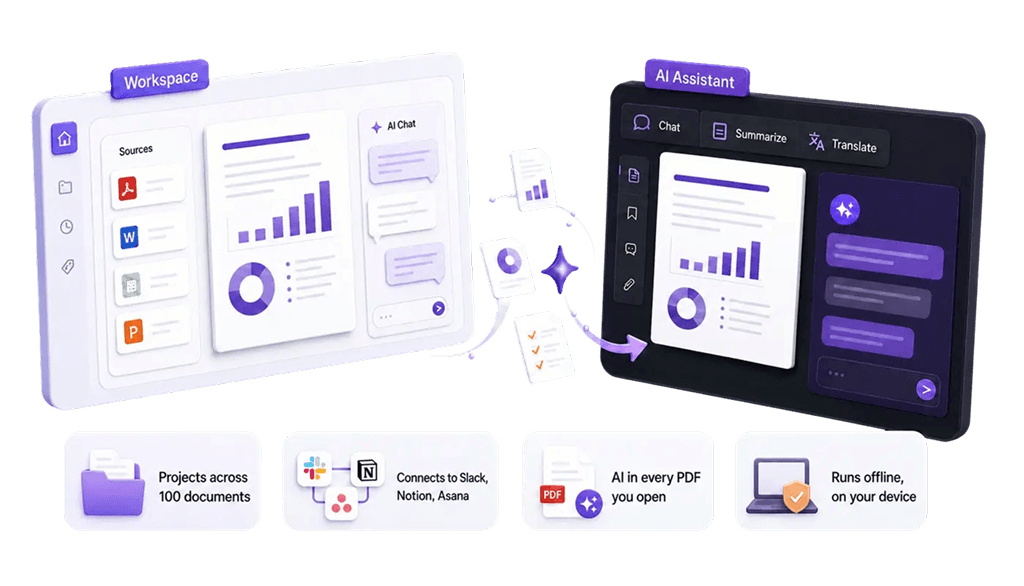
Foxit Workspace is an AI knowledge hub for multi-document analysis and content generation. Load up to 100 files into a project, ask questions across all of them, and create the presentation, report, or diagram you actually have to deliver.
300 monthly credits free with any Foxit account. Windows and Mac.
Get started with Workspace in three steps
A chat window forgets you the moment you close it. A Workspace project holds everything: the files, the history, what you asked last week, and what you were trying to get done. Come back tomorrow and pick up where you stopped.
Add your sources
Up to 100 files per project. PDFs, Word, Excel, PowerPoint, images, and links, all indexed and searchable together. Scanned documents get read through OCR.
Workspace reads all of it
Documents are parsed with Foxit's own PDF engine, in the correct reading order. Multi-column layouts, tables, and scans come through intact rather than as scrambled text.
Ask for the outcome, not the step
Describe what you need. Workspace plans the work, moves through your documents, and keeps going until the task is finished.
Generate insights across every document and turn them into new content
Ask a question no single file can answer
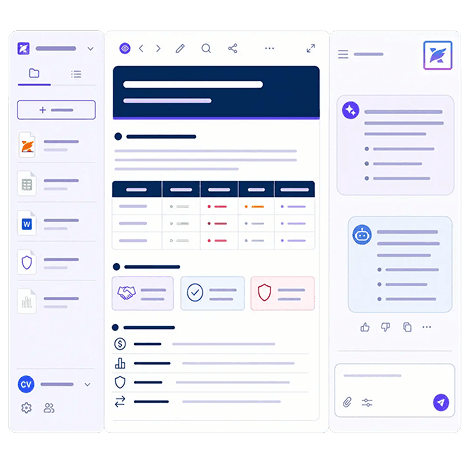
Load up to a hundred contracts, reports, spreadsheets, and forms into one project. Workspace reads every one of them and surfaces what's buried across the set: the clause that contradicts your policy, the number that doesn't match the model, the term missing from three of five. Every answer shows the document and section it came from, so you can check it in one click.
Turn what you find into what you have to deliver
Generate the final deliverables you need in minutes. Presentations, reports, diagrams, mind maps, web pages, Markdown, and HTML, generated from the source files already in the project and editable in place.
Switch models without losing your work
Move between multiple versions of GPT and Gemini inside the same project and the same chat. Match the model to the task: one for dense analysis, another for drafting, another when speed matters more than depth. Your files, your history, and everything you've generated stay exactly where they are.
Cut the "busy" out of the work
Goal-oriented AI
Most AI stops when it has produced an answer. Workspace treats a request as a job to complete. It plans the steps, works through your documents, and keeps going until there's a result. You describe the outcome once instead of walking it through the middle.
Skills
Save the work you repeat as a Skill anyone can run in one click. Presets cover Summary, Mind Map, Report, Infographic, Quiz, and Flashcards, and you can build your own. No prompt expertise required, and the output is the same quality whoever runs it. Custom Skills are available on the free tier.
Connectors
Pick a connector, sign in once, and Workspace works with Notion, Atlassian, Asana, HubSpot, and Figma alongside your files. Available in the Workspace desktop app.
See what teams are creating with Workspace
Renewal season
Twelve vendor contracts, one question: where does the pricing differ and what auto-renews in the next quarter? Load them all, ask once.
A quarter of research into a deck
Reports, transcripts, and a spreadsheet go in. A structured presentation comes out, edited in the project and exported when it's right.
A project you just inherited
Someone left and handed you 40 documents. Build the project, ask what you're looking at, and get oriented in an afternoon instead of a week.
A one-sheet for the conference
Point Workspace at your product documentation and describe the audience. It writes and lays out the flyer.
How it compares to Acrobat PDF Spaces
Acrobat PDF Spaces and Foxit Workspace both bring a set of documents together for AI to work across. They diverge on what happens next.
MCP connectors are available in the Workspace desktop app.

Control who uses AI and how
Workspace runs inside your existing Foxit account, so there's no separate vendor to evaluate. Documents stay in your project rather than being used to train models. Administrators managing Foxit through the Admin Console keep visibility into what's active and who's using it.
Simple pricing for Foxit AI Assistant
Foxit AI Assistant
Included with every Foxit account
FREE
- 300 AI credits per month
- AI Assistant in Foxit PDF Editor and PDF Reader
- Full access to Workspace
- Local AI on supported devices, no credits used
- Works in desktop, web, and mobile apps
Frequently asked questions
Foxit Workspace is a browser-based AI environment for work that spans multiple documents. A Workspace project holds up to 100 source files, keeps context between sessions, and works through multi-step requests until a result is produced. Foxit Workspace generates finished outputs including presentations, diagrams, reports, and web pages, saved and editable inside the project.
Foxit Workspace is available as a desktop application for Windows and Mac, and as a browser application requiring no installation. Both need only a free Foxit account, and a Foxit PDF Editor subscription is not required for either. The desktop application adds MCP connectors for external tools. Foxit Workspace can also be opened from a link inside Foxit PDF Editor or from Cloud Applications on foxit.com.
Foxit Workspace reads PDF, Microsoft Word, Excel, and PowerPoint files, images, and web links, with up to 100 sources per project. Scanned documents are made searchable through OCR. PDFs are parsed with Foxit's own rendering engine in correct reading order, so multi-column layouts, tables, and scanned pages are interpreted accurately.
Skills are reusable one-click actions in Foxit Workspace. Preset Skills include Summary, Mind Map, Report, Infographic, Quiz, and Flashcards. Custom Skills can be created for tasks a team repeats, and are available on the free tier. Because the instructions are saved in the Skill, output quality stays consistent regardless of who runs it.
Yes. The Foxit Workspace desktop application includes one-click connectors for Notion, Atlassian, Asana, HubSpot and Figma, and supports the Model Context Protocol (MCP) for connecting to additional tools. Connectors are not available in the browser version of Foxit Workspace. Foxit PDF AI Assistant in Foxit PDF Editor on desktop also supports MCP connectors.
Finish something today
Free with any Foxit account. Download the desktop app to get connectors, or start in your browser right now.