Make Mathematical Formulas Accessible in PDFs with MathML
Use AI Assistant in Foxit PDF Editor to convert mathematical and chemical formulas into structured MathML or LaTeX. Review and edit the output, reuse it in authoring workflows, or associate MathML with formula tags in a tagged PDF.
Turn Formula Images into Structured Content
Mathematical formulas can be difficult for assistive technology to interpret and time-consuming for users to recreate. Foxit automatically converts visible formulas into structured markup, making them accessible and reusable.
Convert Formulas with a Few Clicks
Capture a formula from the page and convert it into MathML or LaTeX.
Give Complex Math Meaningful Structure
Represent relationships among symbols, fractions, superscripts, subscripts, matrices, and other mathematical elements in machine-readable markup.
Support Accessible PDF Workflows
Associate MathML with formula tags that can be read by assistive technologies and downstream systems.
Give Complex Formulas More Than a Text Description
Older PDF accessibility workflows often represent a formula as an image with alternate text. That may be enough to describe a simple equation, but it does not preserve the internal structure people need to understand or navigate complex math. MathML encodes the relationships within a formula so compatible tools can process the expression as mathematical content.
Flat Text Description
- Describes the formula as a single text string
- Provides limited support for navigating complex notation
- Offers little value for editing or republishing
Structured MathML
- Represents the formula's mathematical structure
- Gives compatible assistive technologies structured content to interpret
- Creates reusable markup for compatible authoring and publishing workflows
Convert a Formula in Three Steps
Work inside the PDF you already have open.
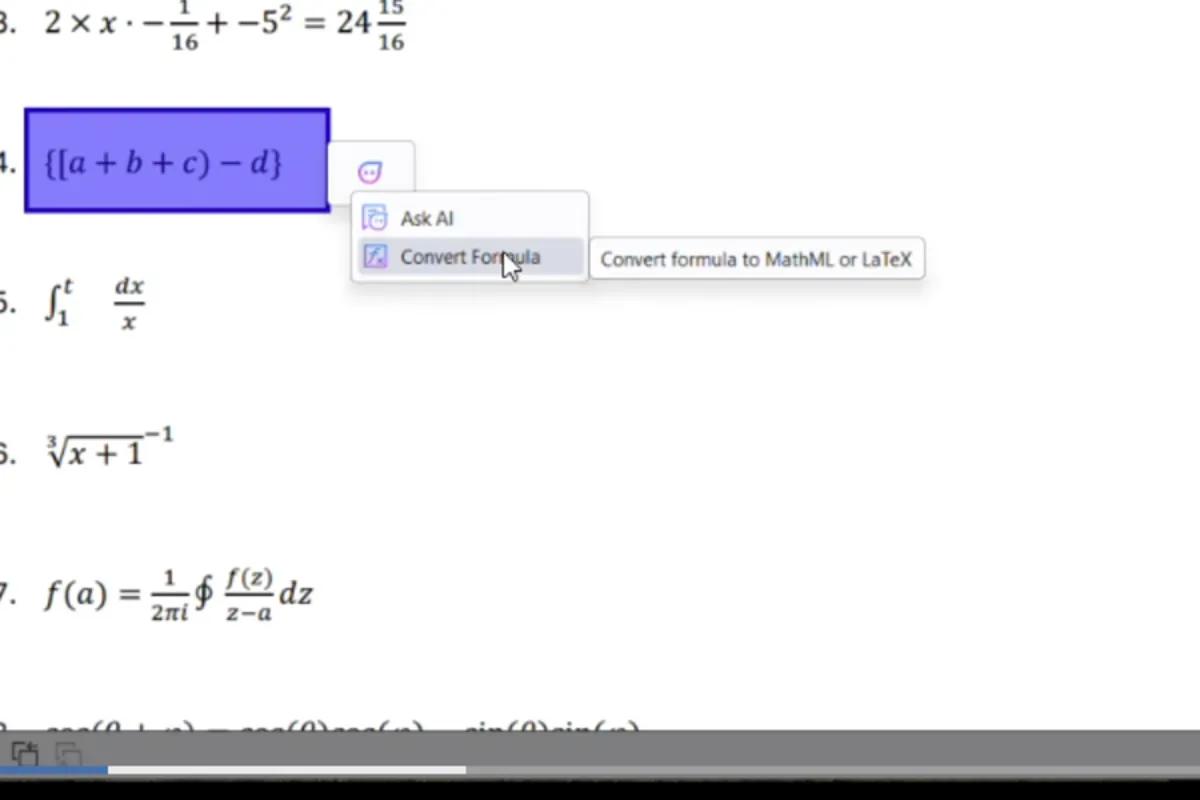
Select the Formula
Capture a formula with the Snapshot tool or Select Text and Image, then choose Convert Formula from the AI Assistant menu.
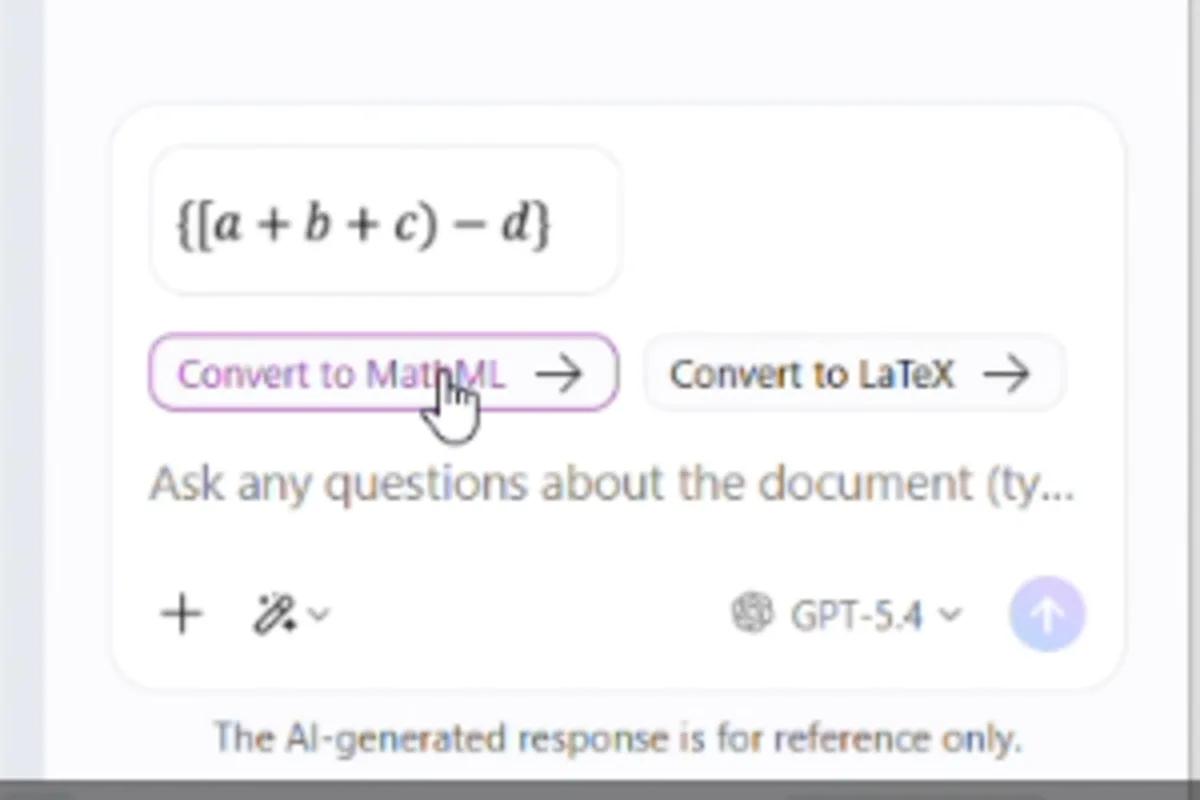
Choose MathML or LaTeX
Let AI Assistant analyze the notation and generate the output format your workflow requires.
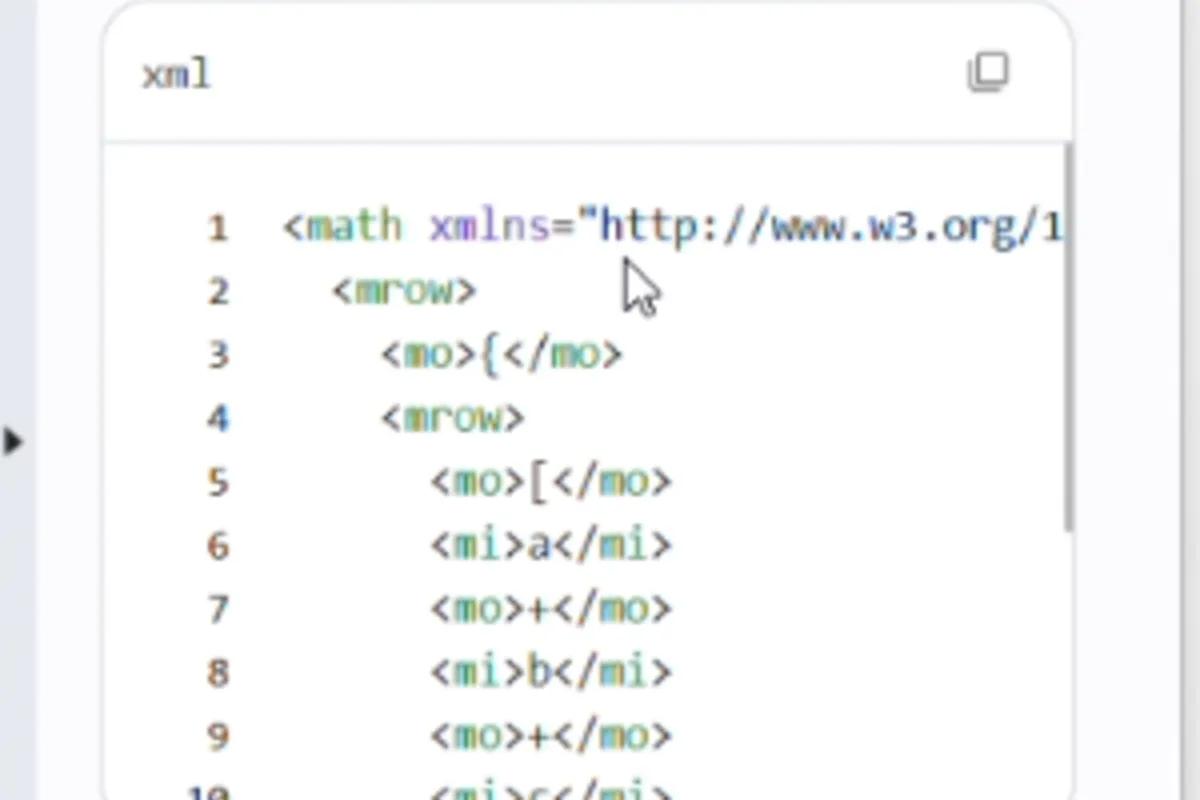
Review and Use the Markup
Review and edit the generated markup. Copy it into another workflow or associate the MathML with the corresponding formula tag in a tagged PDF.
Convert Mathematical and Chemical Notation
Capture equations, matrices, fractions, and chemical formulas directly from the PDF page. Foxit converts the visible notation into structured markup so you can stop rebuilding complex expressions by hand.
- Generate MathML or LaTeX from the same selection
- Represent notation such as superscripts, subscripts, fractions, matrices, and reaction structures
- Review and edit the generated markup before using it
Add MathML Where Accessibility Tools Can Find It
In a tagged PDF, associate generated MathML with the corresponding formula tag. This gives compatible assistive technologies access to machine-readable math instead of relying only on a visual formula or flat text description.
- Start from the Tags panel in an already-tagged PDF
- Review and edit the MathML before associating it with the formula tag
- Support remediation workflows built around PDF 2.0 and PDF/UA-2
Work Through Every Formula in One Pass
Use the Formula to MathML dialog to review detected formulas by page, see which ones already include MathML, and update a tagged document systematically.
- Organize detected formulas by page
- Identify formulas that already contain MathML
- Review and associate generated markup with the corresponding formula tags
Help Move Accessible Math Forward
PDF 2.0 and PDF/UA-2 established standardized support for MathML in tagged PDFs. Foxit helped advance an early proof of concept for accessible math, including MathML display and editing in Foxit PDF Editor and Foxit PDF Reader and collaboration with an NVDA expert on assistive-technology integration.
Learn about Foxit's accessible math proof of conceptMathML in Foxit PDF Editor
MathML, or Mathematical Markup Language, is a structured format for representing mathematical expressions. In a tagged PDF, MathML can be associated with a formula so compatible assistive technologies and downstream systems can interpret the expression as mathematical content instead of treating it only as an image or flat text string.
Select the formula with the Snapshot tool or Select Text and Image, then choose Convert Formula from the AI Assistant menu. AI Assistant generates MathML that you can review, edit, copy, or associate with the corresponding formula tag in a tagged PDF.
Yes. AI Assistant can generate MathML or LaTeX from the same selected formula. Use MathML for structured math in compatible PDF accessibility workflows, or choose LaTeX when you need markup for authoring and publishing workflows.
Yes. Foxit can convert mathematical expressions and chemical notation, including structures such as subscripts, superscripts, and reaction symbols. Review the generated markup before adding it to a document or reusing it elsewhere.
Not by itself. MathML helps provide the structured mathematical content required for accessible math, but PDF/UA-2 conformance depends on the entire document. Correct tagging, reading order, language settings, metadata, non-math image descriptions, and other accessibility requirements must also be reviewed.
More Powerful PDF Features
Discover other tools in Foxit PDF Editor that help you work smarter with documents.