Foxit AI Assistant
Security Overview
Foxit AI Assistant is a tool provided by Foxit for intelligent document processing. This document introduces the basic functions of Foxit AI Assistant, as well as how it handles your documents and data and ensures their security.
About Foxit AI Assistant
Foxit AI Assistant refers to the AI capabilities provided via the AI Assistant in Foxit PDF Editor, as well as the AI features that you can use separately at ai.foxit.com, and other specific features in Foxit PDF Editor that are powered by AI.
Foxit AI Assistant integrated with Azure AI Service, which is an innovative solution that helps users understand and interact with documents more effectively. By combining advanced artificial intelligence technology with powerful language processing capabilities, the Foxit AI Assistant offers a range of functions that enhance productivity and streamline document comprehension.
- Document Summary - The OpenAI summary service uses artificial intelligence to generate a concise and accurate summary of a given text input.
- Document Re-write - The OpenAI rewrite service uses machine learning to automatically paraphrase or rewrite text while maintaining its original meaning.
- Translation - Translate selected text or full documents into target languages, maintaining the original formatting and layout as much as possible.
- Ask AI - Chat with AI using documents, images, and selected text. Provides concise explanations and context-aware, relevant, and helpful insights by understanding documents, images, and selected text.
- Spelling and Grammar Correction - An AI-powered feature that automatically detects and corrects spelling and grammar errors in your content.
- Smart PDF Commands - Delegate tasks to our AI Assistant for efficient document processing.
- Auto Create Bookmark - An AI-powered feature that automatically generates bookmarks based on document content for quick navigation and organization.
- Intelligent Reading - An AI-powered text-to-speech feature that converts text into natural-sounding speech to enhance the reading experience.
- Foxit PDF Editor as MCP Host (Only for Windows & Mac)
Foxit PDF Editor acts as an MCP Host, enabling secure and flexible integration between the local PDF editing environment and external enterprise tools through custom MCP Servers. This allows real-time, context-aware document interactions that seamlessly embed into enterprise workflows to improve efficiency and business outcomes.
And other more features.
Foxit AI Assistant Architecture
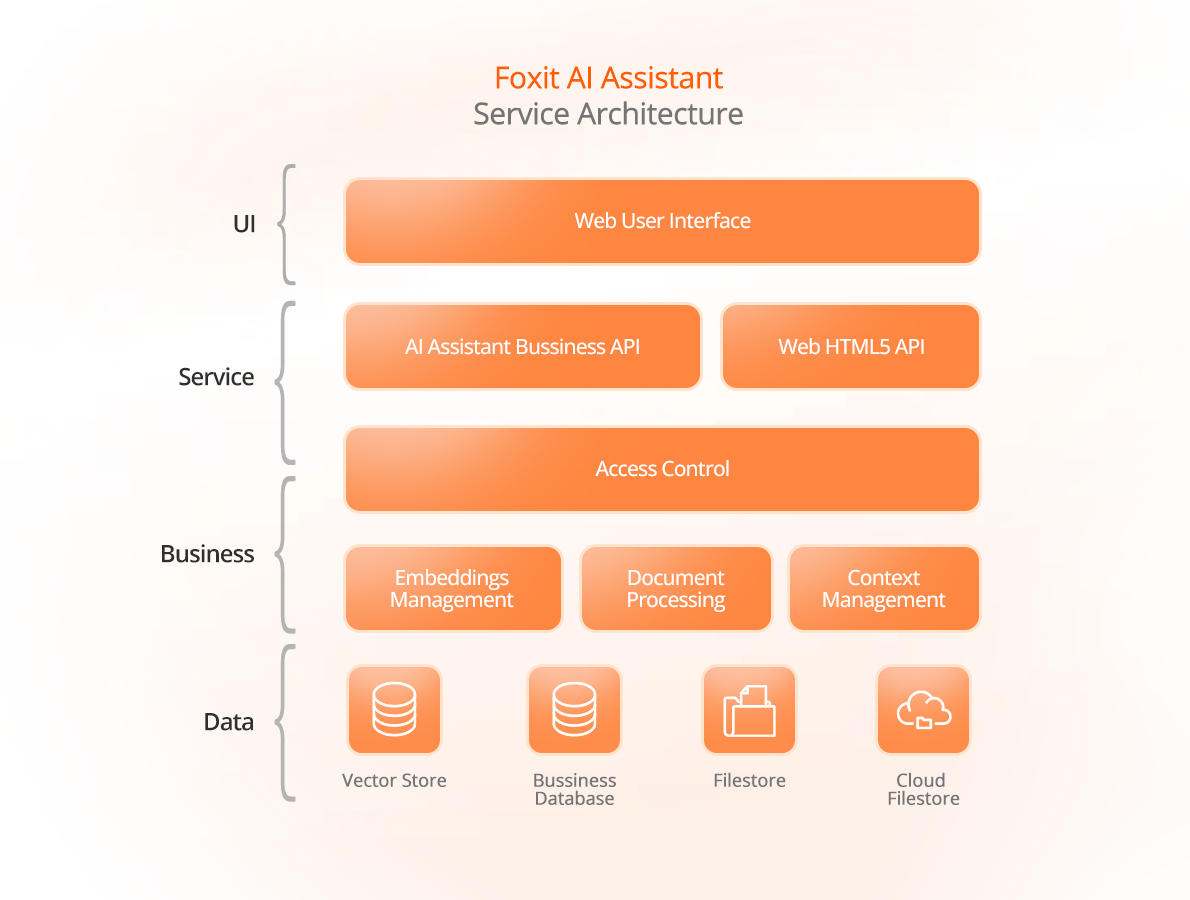
The objective of the design of the Foxit AI Assistant service architecture is to provide highly reusable, secure, and scalable service components. With the aim of achieving this overarching goal, we have implemented a layered approach, encompassing the following tiers: user interface layer, service layer, business layer, and data layer.
The user interface layer presents the AI Assistant window in a web page format, receives user questions or commands, and returns responses to the user.
The service layer provides service APIs for application invocation and includes user access control functionalities. It includes the following:
- AI Assistant Business API: Provides business logic APIs for managing user tokens, document summarization/enhance writing/translation, and more.
- Web HTML5 API: Provides communication interfaces between web components and the application end.
- Access Control: Offers user access control capabilities, defining which resources users can access and their permissions for accessing those resources.
The business layer encompasses document data processing, vector management, and chat session context management, among others. It includes the following:
- Embeddings Management: Manages vector data for text, including updates, similarity search, and comparisons. An embedding is a relatively low-dimensional space into which high-dimensional vectors can be translated.
- Document Processing: Identifies and extracts content from documents, segments text content, and more.
- Context Management: Manages the context of user sessions.
Lastly, the data layer comprises the repositories and storage mechanisms used by the AI Assistant. It incorporates components such as vector databases, business databases, local document storage, and cloud document storage. These components play a crucial role in efficiently managing and accessing the data required for the AI Assistant's operations.
By implementing this architectural design, the Foxit AI Assistant service ensures disaster backup and recovery capabilities, guaranteeing the availability and stability of the services provided to users. Additionally, the architecture emphasizes observability, enabling real-time monitoring of the service's health. In the event of any service interruptions or anomalies, the system can swiftly identify and resolve issues, minimizing any disruptions experienced by users.
How does Foxit AI Assistant process data
Document insight tasks
Includes document Q&A, summarization, rewriting, image reading, auto-bookmarking, and more for intelligent document processing.
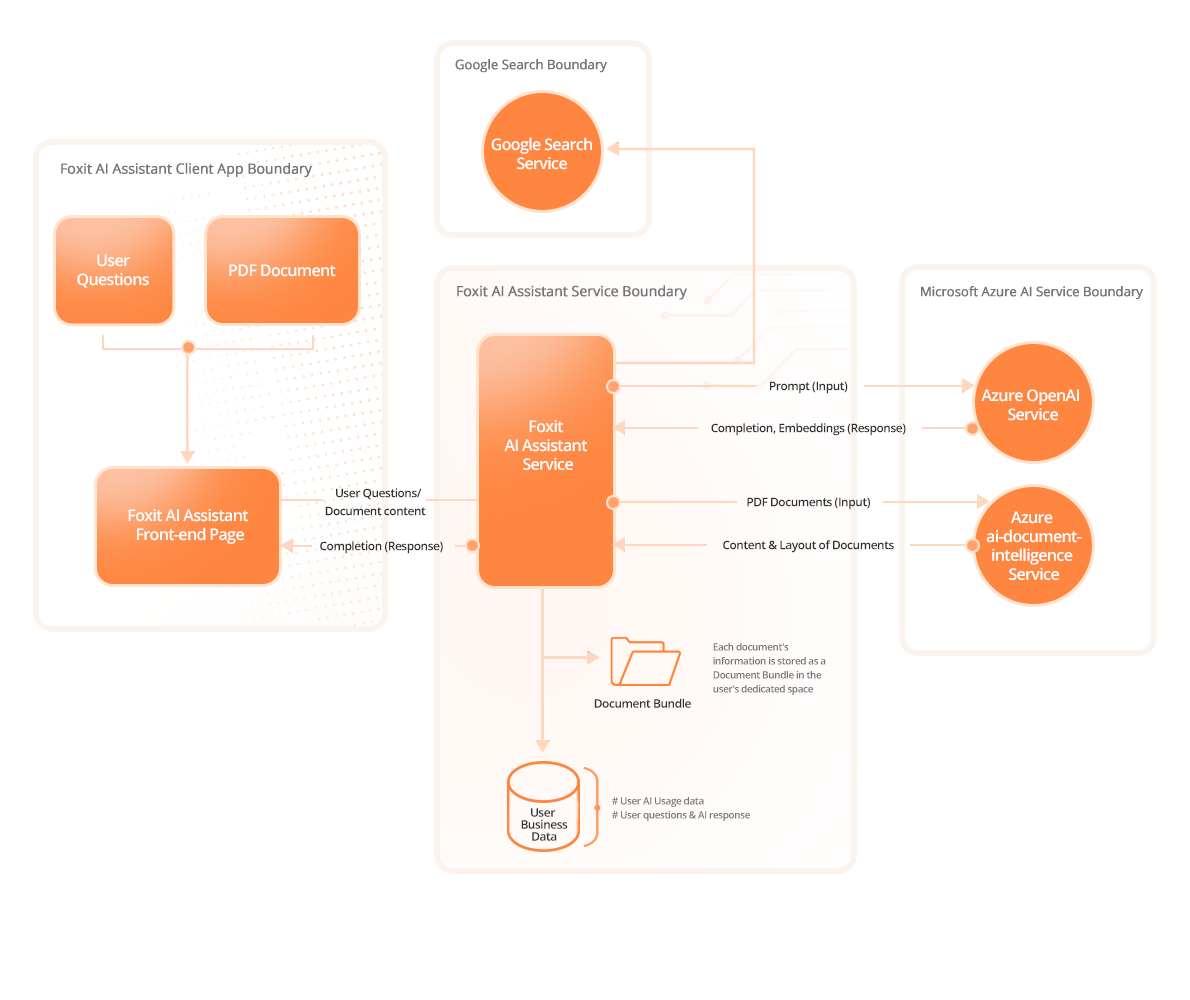
The subsequent steps outline the main workflow within the Foxit AI Assistant document insight assistant tasks:
- User enters an input and submits it
- The front-end interface calls the Foxit AI Assistant Service API, passing the user input and the PDF documents as the parameters to Foxit AI Assistant Server.
- PDF document processing (only on first interaction after document selection)
- a) Using the layout recognition engine powered by Microsoft Azure AI-Document Intelligence service recognizes the document’s layout information and extracts the content of documents.
- b) The extracted content is converted into embeddings and bundled - as a Document Bundle - in a vector database for reuse in subsequent queries.
- Backend Processing & Response Generation.
- a) Contextual Retrieval (RAG): The system performs vector retrieval over the Document Bundle, selecting the document segments most relevant to the user’s query. It then composes a rich contextual prompt by combining these segments with the original user input and sends this prompt to Azure OpenAI for generation.
- b) Initial LLM Inference: Azure OpenAI is invoked to generate an initial response.
- c) Refinement & Secondary Retrieval: Based on the LLM’s output, the system may:
- i. Perform a second-stage retrieval from the Document Bundle, or
- ii. If web search is enabled by the user, fetch additional information from external sources.
- This new context is then used to call Azure OpenAI again, producing a refined, higher-quality answer.
- Result Delivery: The final generated response is returned to displayed to the user.
Intelligent reading task
Focus on converting document text to speech for an enhanced reading experience.
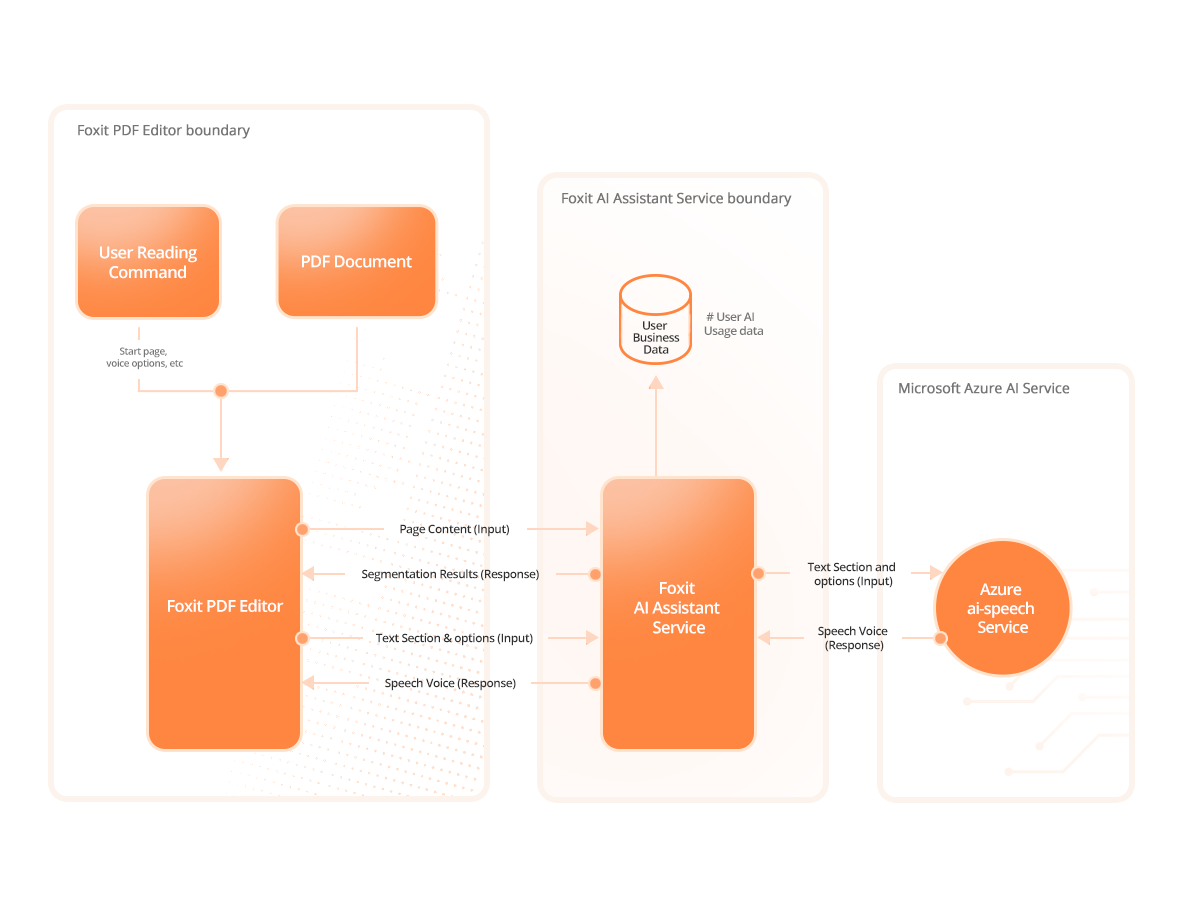
The subsequent steps outline the main workflow within the Foxit Intelligent Reading tasks
- Users select voice-related options and start intelligent reading.
- Text Preprocessing
- a) Foxit PDF Editor extracts page text information and requests the Foxit AI Assistant Service API to perform text segmentation.
- b) The Foxit AI Assistant Service splits the text paragraphs into reasonable segments based on configuration and policies, and returns them to Foxit PDF Editor.
- Text to Speech
- a) Foxit PDF Editor calls the Foxit AI Assistant Service API based on the segmentation results to convert text paragraphs into specified audio segments.
- b) The Foxit AI Assistant Service API invokes the Microsoft Azure AI Speech Service to convert text paragraphs into specified audio segments and returns them to Foxit PDF Editor.
- Audio Playback: Foxit PDF Editor caches the converted audio segments locally and plays them. The cached audio segments are deleted after the document session is closed.
How does Foxit AI Assistant secure data
Secure data in transit
All web APIs are called via the HTTPS protocol, including calls to the Foxit AI Assistant Service API and Azure AI Services API. This ensures the security of the document and user data transmission. Additionally, the HTTPS protocol versions and cipher suite selections are regularly reviewed and updated to ensure adherence to industry best practices.
Secure data in rest
Foxit takes diverse security measures to ensure the security of data at rest, with the main measures as follows.
- User-Specific Isolation: Each user's documents are stored in isolated, user-specific directories, ensuring no cross-user access.
- Document Bundle Isolation: Every document is stored as a separate Document Bundle, maintaining strict isolation between bundles.
- Data Center Security: Leveraging AWS's Tier-4 data centers, Foxit ensures robust access controls, environmental safeguards, and restricted access limited to authorized personnel in Virginia, Frankfurt, and Montreal.
- Data Privacy: Databases are firewall-protected and not publicly accessible, with access restricted to authorized personnel for business or legal purposes only.
- Off-Grid Operation: For high-security needs, Foxit offers an "off-grid" mode, allowing software operation without cloud access.
Data Handling and Retention
Foxit AI Assistant manages AI interaction data depending on the product — Foxit PDF Editor or ai.foxit.com. This section explains how data is processed, stored, and retained to balance user experience, performance, and privacy protection.
Controller Identity
Foxit is the data controller for personal data processed through the AI Assistant chat history functionality.
Purpose of Processing
AI interaction data is processed to provide contextual and continuous assistance, helping users maintain session context, improve workflow efficiency, and reduce repetitive tasks.
Foxit does not utilize any data from users’ chat history stored in Stored Chats for AI model training purposes; this data is exclusively used to support the historical chat feature.
Processing Activities
Foxit processes the following data to provide contextual AI assistance:
- Chat Context: Include all user-AI interaction data, such as user inputs, AI-generated responses, conversation history for continuity, and references to related documents or functional operations within the AI Assistant.
- Document Bundles: Include processed document content such as extracted text, images, layout, and embeddings, which are retained or cached to provide relevant information during AI interactions.
- Original Documents: Include the uploaded or opened documents themselves, stored separately in the Cloud Documents (ai.foxit.com only) and not considered part of Chat Context or Document Bundles. For the AI Assistant in Foxit PDF Editor, original documents are not uploaded to the Cloud Documents.
- Web Search Results: Include only returned URLs; search queries are not stored.
Temporary Chats
Temporary chats are cached for short, performance-optimized periods and are automatically deleted after a brief retention period.
- Chat Context: Deleted after the chat session ends.
- Document Bundles: Retained for up to 48 hours.
- Web Search Results: Deleted after the chat session ends.
- Original Documents: Not processed or uploaded to the Cloud Documents for Temporary Chats.
Stored Chats
Stored chats persist across sessions and remain available until manually deleted by the user or until consent is withdrawn.
- Chat Context: Retained across sessions and deleted only when the user manually deletes the chat or withdraws consent.
- Document Bundles: Retained for up to 48 hours after the associated Chat Context is deleted.
- Web Search Results: Not stored long-term; deleted after the chat session ends.
- Original Documents:
- For ai.foxit.com: Uploaded or opened documents are stored in the Cloud Documents under the AI_Assistant directory.
- For Foxit PDF Editor: Original documents are not uploaded to the Cloud Documents.
User Control
Users maintain full control over their AI chat data and may review or delete stored chats at any time through the product’s built-in data management options. No AI chat data is retained beyond the user’s control, and all deletion actions initiated by the user are strictly enforced by the system. This ensures transparency in data handling and aligns with privacy and compliance requirements.
Right to Withdraw Consent
Users have the right to withdraw their consent for the processing of AI interaction data at any time. Foxit supports a clear and transparent process for exercising this right, and withdrawal affects the continued availability of Stored Chats and access to related AI Assistant features.
Withdrawal Method
Withdrawal of consent is currently supported only through manual request. Users may send a consent-withdrawal request to: [email protected].
Internal Handling Procedure
When a withdrawal request is received through customer support, Foxit’s Cloud Operations team will process the request and update the user’s consent status accordingly. Once consent is withdrawn:
- The user’s Stored Chats and associated interaction data will be deleted.
- The user’s access to the AI Assistant is revoked unless they later choose to re-consent.
Security Model for MCP Host and Third-Party Tool Integrations
Foxit PDF Editor’s MCP Host functionality follows rigorous security principles to protect user data, ensure responsible tool execution, and support secure integrations with third-party services such as Gmail, Outlook, and Jira. This unified security model outlines the core protection mechanisms applied throughout tool invocation, credential handling, and external service access.
Secure Execution of MCP Tools
- User Confirmation Required: All MCP tools—whether local (stdio) or remote (Streamable HTTP, SSE)—require explicit user confirmation before being executed. No tool is invoked without the user’s knowledge, unless it is manually marked as “trusted.”
- Session-Level Context Isolation: While MCP tool configurations (e.g., name, mode, endpoint) are reusable across sessions for convenience, each invocation and result are strictly scoped to the current Editor session, ensuring that tool actions, data exchange, and AI context remain isolated per user and per document.
Authentication and Access Control
- Explicit Endpoint Configuration: For HTTP-based MCP Servers, users must explicitly define the full endpoint URL and optionally provide required credentials (such as API keys or OAuth tokens). No tool can self-register or alter its settings.
- Local Credential Storage and User Control: Access authorization is handled directly between the user and the third-party service via the MCP Server (e.g., through an OAuth flow). Foxit does not evaluate or issue any access permissions. Once the user authorizes the connection, Foxit PDF Editor locally stores the resulting credentials (such as tokens or API keys) to support tool invocation. These credentials are never uploaded or transmitted to Foxit cloud services. Users can view, update, or delete the stored credentials at any time through the “MCP Manager” interface.
Data Minimization and Lifecycle Control
- Minimal Required Data Only: The Editor only sends task-specific information (e.g., user prompts, relevant document fragments) to the selected MCP Server. No complete documents or historical data are transmitted unless explicitly requested by the user.
- Session-Scoped Tool Output: MCP Server responses are retained only within the current session. Foxit does not persist results beyond the active usage context unless the user manually saves them.
- Local Request Logging for Troubleshooting: Foxit PDF Editor records local MCP Server request logs to assist with user troubleshooting. These logs are used only locally and automatically deleted once the Editor is closed.
Third-Party Application Data Handling
When a user connects Foxit to third-party services (e.g., Gmail, Jira) via an MCP Server, additional controls apply to ensure full transparency and user governance:
- User Authorization Required: Access to third-party services is never automatic. It requires explicit user consent via OAuth or API key configuration. No background linking or polling is performed.
- No Persistent Storage of Third-Party Data: Foxit does not store or sync data from connected services. All responses are session-scoped and memory-resident only, unless manually exported by the user.
- Data access scope is limited by third-party authorization: The data access performed by the MCP Server is restricted to the scope explicitly authorized by the user through the third-party service’s OAuth or API key permissions. The MCP Server can only access data within this authorized scope, and the exact permissions are controlled by the third-party service provider. Foxit and the MCP Host rely on the MCP Server and third-party authorization mechanisms to ensure that access rights align with user consent and authorization.
- User Control over Connections: Users can disable or delete any tool connection at any time through the Editor interface. This immediately stops all further interaction with the linked service.
Secure development practices
Foxit follows the industry-standard Security Development Lifecycle (SDL) to ensure the security and reliability of AI Assistant. Key measures include:
- Secure Design: Threat modeling identifies risks early, with security controls embedded in the design phase.
- Secure Coding: Strict coding standards prevent common vulnerabilities.
- Code Audits & Vulnerability Testing: Regular audits and testing ensure code integrity.
- Security Testing: Comprehensive testing combines automated and manual methods.
- Secure Release: Rigorous security reviews ensure compliance before deployment.
Additionally, Foxit prioritizes security training to enhance developers' expertise. These practices commit Foxit to delivering a secure and reliable AI Assistant.
Privacy and Guidelines
Your use of Foxit’s AI solutions is governed by Foxit AI User Guidelines, which are incorporated into Foxit End-User License Agreement (Foxit EULA) and Foxit General Terms of Service. The Guidelines reflect our commitment to maintaining consistency with applicable Laws and regulations and the company’s values and to advancing trustworthy AI for our users and clients.
For more information on Foxit AI User Guidelines, please go to foxit.com/company/ai-user-guidelines/
The Azure AI service used by the AI Assistant has its own security standards. For details, refer to:
Conclusion
Foxit offers a best-in-class level of security protection tailored to meet the diverse needs of users with varying requirements for PDF functions, as well as organizations of different sizes and industries. We acknowledge the sensitivity of your information and workflow, emphasizing the utmost protection they demand. With Foxit, you gain a trusted vendor committed to not only delivering uncompromising PDF software but also ensuring its security across all facets in accordance with industry best practices.
For more information on Foxit security, please go to the Foxit Security Center.