
Enterprise Document Automation: Scale High-Volume Processing
Convert, compress, OCR, render, and archive millions of documents automatically. Foxit's purpose-built server software replaces fragmented tools with a single, integrated processing infrastructure, so your teams can focus on outcomes instead of file formats.
Why Do Enterprises Choose Foxit for Document Automation?
Built for Volume, Not Just Volume Claims
Foxit is engineered for high-volume, non-interactive document automation that runs quietly in the background as part of your enterprise workflows. Rather than offering generic tools, we build solutions around your real-world scenarios, so processing scales with your operations instead of getting in their way.
Deep Integration, Not Bolt-On
Every product connects natively with existing enterprise infrastructure (ERP, ECM/DMS, SAP, SharePoint, mail servers, RPA platforms, and custom applications) via web services, C/.NET APIs, and open plugin interfaces.
Compliance Without Compromise
ISO 19005 PDF/A compliance, ADA/Section 508 auto-tagging, Bates stamping, full audit trails, and document policy enforcement come built in, not bolted on as afterthoughts.
Consolidate, Don't Add
Replace the fragmented ecosystem of decentralized PDF tools, freeware, and department-level workarounds with one governed, centrally managed infrastructure. Cut licensing costs, slash maintenance overhead, and reduce compliance risk, all at once.
Which Enterprise Document Automation Product Is Right for You?
Purpose-built tools for each stage of the document lifecycle: generation, OCR digitization, compression, and archival. Every product delivers deep integration, high-volume throughput, and enterprise-grade reliability.
Foxit Maestro Server OCR
Turn Scanned Documents into Searchable, Actionable Data, Fast
When OCR is your core challenge, Maestro delivers. It converts massive volumes of scanned and paper documents into fully searchable PDFs with industry-leading accuracy, so your downstream systems get clean, reliable text from day one.
- Voting OCR engine cross-validates results for superior text accuracy
- Processes large volumes of pages in parallel across all available CPU cores
- Auto de-skew, despeckle, rotation, color inversion, and cropping sharpen source images before recognition
The cost-effective way to extract text from images and PDFs for AI processing. Maestro customers often discard the source PDF and just want clean text, making this the most affordable option at higher volumes.
Foxit PDF Compressor
Easy wizard-based configuration
Need conversion, compression, PDF/A archiving, and OCR in a single product? PDF Compressor covers the full workflow, from multi-source ingestion to compliant, searchable output, ready to deploy without custom code or complex configuration.
- Proprietary MRC (Mixed Raster Content) compression shrinks file sizes dramatically while preserving quality
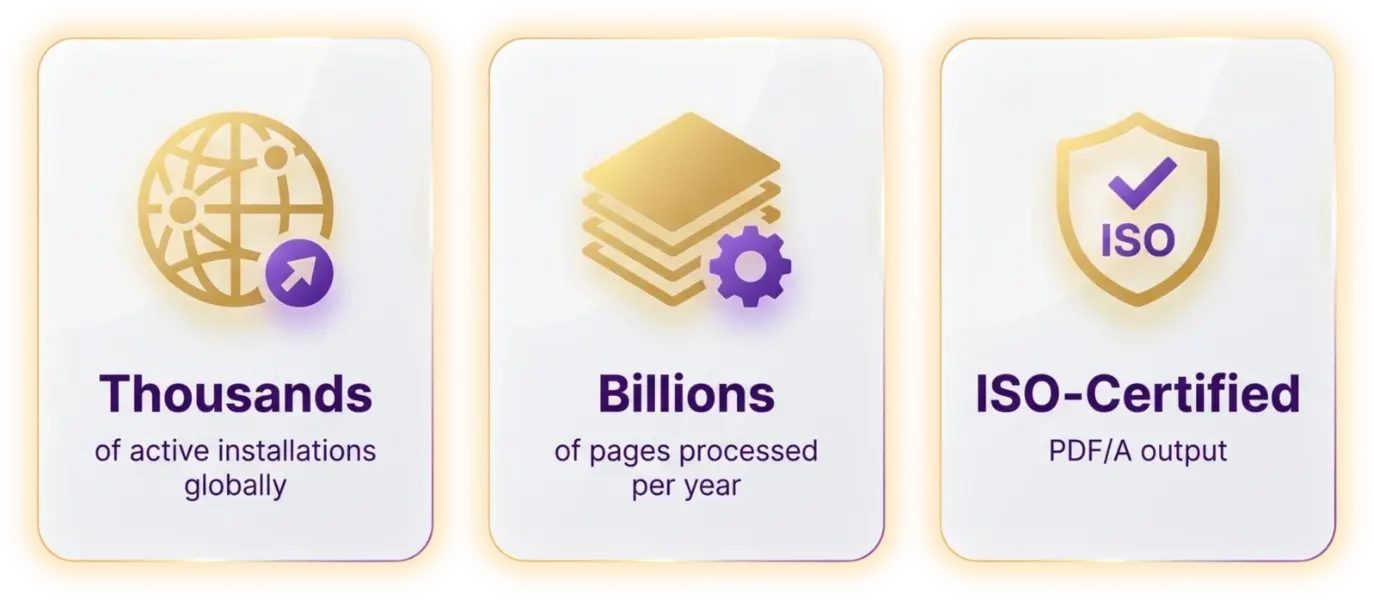
- Full PDF/A-1, -2, and -3 compliance across all conformance levels (ISO 19005)
- Born Digital feature converts MS Office, email, and existing PDFs to PDF/A without rescanning
Organizations that need a proven, deploy-and-go solution for conversion, compression, and archiving. Typical customers include insurance companies, banking institutions, the healthcare sector, and government departments.
Foxit Rendition Server
Automate Complex Document Workflows End-to-End at Any Scale
When you've outgrown out-of-the-box solutions, Rendition Server steps in. It orchestrates ingestion, routing, conversion, OCR, compression, redaction, and output in one governed platform that is fully customizable and built to handle your most demanding deployments.
- End-to-end workflow automation: ingestion, routing, conversion, OCR, compression, redaction, and output in one platform
- Centralized document conversion, on-premises, hosted in your own environment, accessible to any system
- Custom assembly line workflows tackle complex, multi-step, multi-format scenarios
Large enterprises managing complex, multi-system document workflows at the highest scale. Organizations that need custom workflow logic, full auditability, and one governed platform to replace fragmented point solutions.
How Do Maestro, PDF Compressor, and Rendition Server Compare?
All three products share a common mission: eliminating manual, fragmented document processing at scale. They differ in scope, customizability, and deployment complexity. The right choice depends on how complex your workflow requirements are, not just which task you need to automate.
Primary strength
- Maestro Server OCR
- Best-in-class OCR accuracy and throughput
- PDF Compressor
- Out-of-the-box conversion, compression, and PDF/A archiving
- Rendition Server
- End-to-end, fully customizable document workflow automation with fault tolerance and massive scalability
Workflow scope
- Maestro Server OCR
- OCR-focused
- PDF Compressor
- Multi-function (OCR + compression + conversion + archiving)
- Rendition Server
- Full pipeline (ingestion → routing → OCR → compression → redaction → output)
Customizability
- Maestro Server OCR
- Configurable
- PDF Compressor
- Configurable
- Rendition Server
- Fully extensible via custom assembly lines and plugin interfaces
Deployment complexity
- Maestro Server OCR
- Low, deploys fast
- PDF Compressor
- Low-to-medium, minimal configuration
- Rendition Server
- Medium-to-high, built for complex, individual deployments
Best scale
- Maestro Server OCR
- High-volume OCR workloads
- PDF Compressor
- Standard-to-large enterprise deployments
- Rendition Server
- Fault-tolerant, massively scalable for mission-critical document automation
OCR
- Maestro Server OCR
- ✅ Integrated
- PDF Compressor
- ✅ Integrated
- Rendition Server
- ✅ Integrated
Compression
- Maestro Server OCR
- ❌
- PDF Compressor
- ✅ Best-in-class MRC compression
- Rendition Server
- ✅ Best-in-class MRC compression
PDF/A archiving
- Maestro Server OCR
- ✅
- PDF Compressor
- ✅
- Rendition Server
- ✅
Custom workflow logic
- Maestro Server OCR
- ❌
- PDF Compressor
- ❌
- Rendition Server
- ✅
Full audit trail
- Maestro Server OCR
- ❌
- PDF Compressor
- ❌
- Rendition Server
- ✅
| Feature | Maestro Server OCR | PDF Compressor | Rendition Server |
|---|---|---|---|
| Primary strength | Best-in-class OCR accuracy and throughput | Out-of-the-box conversion, compression, and PDF/A archiving | End-to-end, fully customizable document workflow automation with fault tolerance and massive scalability |
| Workflow scope | OCR-focused | Multi-function (OCR + compression + conversion + archiving) | Full pipeline (ingestion → routing → OCR → compression → redaction → output) |
| Customizability | Configurable | Configurable | Fully extensible via custom assembly lines and plugin interfaces |
| Deployment complexity | Low, deploys fast | Low-to-medium, minimal configuration | Medium-to-high, built for complex, individual deployments |
| Best scale | High-volume OCR workloads | Standard-to-large enterprise deployments | Fault-tolerant, massively scalable for mission-critical document automation |
| OCR | ✅ Integrated | ✅ Integrated | ✅ Integrated |
| Compression | ❌ | ✅ Best-in-class MRC compression | ✅ Best-in-class MRC compression |
| PDF/A archiving | ✅ | ✅ | ✅ |
| Custom workflow logic | ❌ | ❌ | ✅ |
| Full audit trail | ❌ | ❌ | ✅ |
Decision Guide: If this is you:
Your top priority is converting large volumes of scanned documents into searchable PDFs with the highest OCR accuracy, and OCR is the core task, not one step in a broader workflow.
You need one product that handles conversion, compression, PDF/A archiving, and OCR without custom development, and your processing environment is relatively standardized.
You need to govern and automate document workflows across multiple departments and systems, require custom workflow logic, or you're replacing a fragmented set of point tools with one centrally managed platform.
Not sure which product fits?
What Challenges Does Enterprise Document Automation Solve?
Most enterprises don't have a clear picture of how documents are created, converted, or archived. The mailroom runs one tool. Finance uses another. Departments install freeware. The result? A sprawling patchwork of formats, quality levels, and compliance gaps, plus a growing divide between what IT policy requires and what's actually happening.
Inconsistent Document Quality
Without standardized PDF output, every department produces documents in different formats and quality levels. That inconsistency slows downstream systems and erodes trust in your data.
Compliance and Archiving Gaps
Documents that don't meet PDF/A standards or lack searchable text create legal and regulatory exposure. Gaps in audit trails put your organization at risk during reviews.
Unsustainable Manual Overhead
OCR processing, format conversion, and archival compression can't scale manually. The labor costs climb, error rates spike, and your teams lose time they'll never get back.
Which Industries Use Enterprise Document Automation?
Government & Public Sector
Automate records management, archiving, and compliance submissions at agency scale.
Financial Services
Enforce document quality and PDF/A compliance across audit-sensitive financial records.
Healthcare
Digitize and archive patient records, consent forms, and clinical docs to meet HIPAA-aligned retention rules.
Legal & eDiscovery
Convert high volumes of case documents into searchable, tamper-evident PDF archives for litigation.
Life Sciences
Produce fully searchable, PDF/A-compliant documentation for FDA and regulatory submissions.
Scan Service Providers / BPO
Process millions of client pages per year with the throughput, accuracy, and compliance SLAs demand.
Enterprise IT / Shared Services
Replace decentralized PDF tools with one governed document conversion infrastructure.
How Do Organizations Use Foxit at Scale?
“Foxit's automated OCR handles our high-volume workflows seamlessly. It continuously converts thousands of scanned files into searchable PDFs, entirely eliminating manual data entry.”
IT Director, Financial Services
“Our archiving is incredibly efficient now. The server-side processing creates highly optimized, ISO-compliant PDFs at scale without sacrificing document quality or text searchability.”
VP of Operations, Healthcare
“Foxit's enterprise tools integrated perfectly into our IT infrastructure. Standardizing massive volumes of varied file types into secure PDFs has completely transformed our backend operations.”
Systems Architect, Insurance
Learn More About Enterprise Document Automation
Enterprise Document Automation FAQ
Enterprise document automation replaces manual, fragmented document processing with server-based software that runs in the background of your existing workflows. It converts, compresses, OCR-digitizes, and archives documents at scale — without your teams touching a single file.
For most organizations, the problem isn't one tool. It's five: the mailroom runs one, finance runs another, departments install freeware. The result is inconsistent quality, compliance gaps, and IT teams firefighting instead of governing. Document automation consolidates that patchwork into one centrally managed infrastructure — one that connects to your ERP, ECM, DMS, SAP, SharePoint, and RPA platforms through standard APIs, not custom glue code.
Foxit's server software handles billions of pages per year across financial services, healthcare, government, legal, and life sciences. Customers save up to 77% in manual task time — that's capacity your teams can put toward work that actually matters.
The highest-impact place to start is standardization. When every department produces documents in different formats and quality levels, downstream systems slow down and compliance gaps build quietly in the background. Server-based conversion — enforced at the point of ingestion, not after — stops the problem before it compounds.
From there, the most effective automation approach works in four layers:
- Convert all output to a single, searchable format at the source — before documents reach your ECM or archive.
- Apply OCR at ingestion, so scanned documents become actionable text for your AI pipelines, case management tools, and search systems.
- Enforce PDF/A compliance automatically, so archiving gaps don't accumulate across departments.
- Route documents through defined workflows — eliminating manual hand-offs between systems and teams.
Foxit's server products cover each layer. You can start with a focused solution for OCR or archiving and expand as your workflow complexity grows.
Start with what the tool actually solves for your environment — not a feature checklist. That said, the capabilities that separate enterprise-grade automation from point tools are:
- High-accuracy OCR — not just OCR, but multi-engine cross-validation with image pre-processing (de-skew, despeckle, rotation correction) that improves source quality before recognition runs. Accuracy at the input means clean data downstream.
- Native integration — your tool should connect to existing infrastructure through standard APIs and web services, not require custom middleware you'll maintain indefinitely.
- PDF/A compliance — full ISO 19005 support across all conformance levels, built in. If it's an add-on, it'll become a gap.
- MRC compression — Mixed Raster Content compression reduces file sizes significantly while preserving visual quality. Essential for archival at volume.
- Parallel processing — the software needs to handle large volumes across all available CPU cores, not queue serially.
- Full audit trails — compliance isn't just about output format. Document policy enforcement and audit logs protect you when reviews happen.
- On-premises or private-cloud deployment — sensitive documents should stay in your controlled environment.
Security and compliance come built into Foxit's server products — ISO-certified output, ADA/Section 508 auto-tagging, and Bates stamping are standard, not add-ons.
For enterprise PDF workflows, purpose-built server software outperforms desktop tools and general automation platforms. The right product depends on your workflow's scope — not just the task you need to automate today.
- Foxit Maestro Server OCR — Start here when OCR accuracy and throughput are the core requirement. It converts large volumes of scanned documents into fully searchable PDFs using a voting OCR engine with parallel processing. It's the most cost-effective path to clean text extraction for AI pre-processing pipelines.
- Foxit PDF Compressor — Start here when you need conversion, OCR, PDF/A archiving, and MRC compression in a single ready-to-deploy product with minimal configuration. Common in insurance, banking, healthcare, and government. Deploy it and it works.
- Foxit Rendition Server — Start here when your workflows span multiple departments and systems, require custom routing logic, or need fault-tolerant processing at the highest scale. It governs the full pipeline: ingestion, routing, OCR, compression, redaction, and output in one platform.
The answer depends on where your current process breaks down. Three scenarios cover most enterprise environments:
- If your bottleneck is OCR quality or throughput — a dedicated OCR server with multi-engine cross-validation and built-in image correction delivers better results than OCR bundled into a general platform.
- If you need conversion, compression, and archiving without custom development — an integrated product that handles all three from one interface removes the risk of hand-off failures between tools.
- If you're managing complex, multi-system workflows — a workflow orchestration platform with custom assembly lines, centralized governance, and full audit trails replaces the fragmented point solutions that each department deployed independently.
Organizations using Foxit cut manual document task time by up to 77% and gain up to 65% in productivity, according to Forrester Consulting. The gains compound when you replace five separate tools with one governed infrastructure.
Enterprise document management spans two distinct layers that are often confused. Your ECM or DMS handles storage, organization, and retrieval. Document processing software — where Foxit operates — handles conversion, OCR digitization, compression, and compliance before content reaches your repository.
Most organizations already have an ECM. What they lack is a governed processing layer that standardizes document quality before anything lands in storage. Without it, every department produces documents in different formats and quality levels, and those inconsistencies compound over time into compliance exposure and unusable archives.
Foxit integrates with the ECM and DMS platforms you already use — including SharePoint, SAP, and other enterprise content systems — through web services, C/.NET APIs, and open plugin interfaces. You get one centrally managed processing infrastructure that feeds clean, compliant output into your existing content repository.
Foxit is a full-stack, AI-powered document ecosystem trusted by over 700 million users and 640,000+ organizations worldwide, with 25+ years of enterprise document expertise built in.
Ready to Bring Order to Your Enterprise Document Workflows?
Whether you're standardizing PDF generation, converting millions of documents to compliant PDF/A archives, or digitizing scanned records at scale, Foxit has the server software to automate it. Let's talk about what you need.